
Requests buried in email and chat
Leave requests live in DMs, three inboxes, and a forms folder. Some get answered same-day, some sit for two weeks, and nobody can say what was approved or by whom.
TempoShift takes the busywork out of managing people's time. Employees request leave in seconds, managers approve from anywhere, balances update themselves, and payroll exports in the format your provider expects. No spreadsheets, no chasing, no surprises.
14-day free trial · No credit card · Workspace ready within 1 business day
Most teams patch together email threads, a balance spreadsheet someone built years ago, and policy enforcement by memory. Then payroll prep eats a day every period.
Leave requests live in DMs, three inboxes, and a forms folder. Some get answered same-day, some sit for two weeks, and nobody can say what was approved or by whom.
Accruals applied by hand, carry-forward caps forgotten, and no record of why a number changed. When someone asks "where did my hours go?", the honest answer is a shrug.
Punches reconciled by hand, overtime calculated in a side sheet, and a copy-paste marathon into the payroll provider — with quiet edits to closed periods nobody catches.
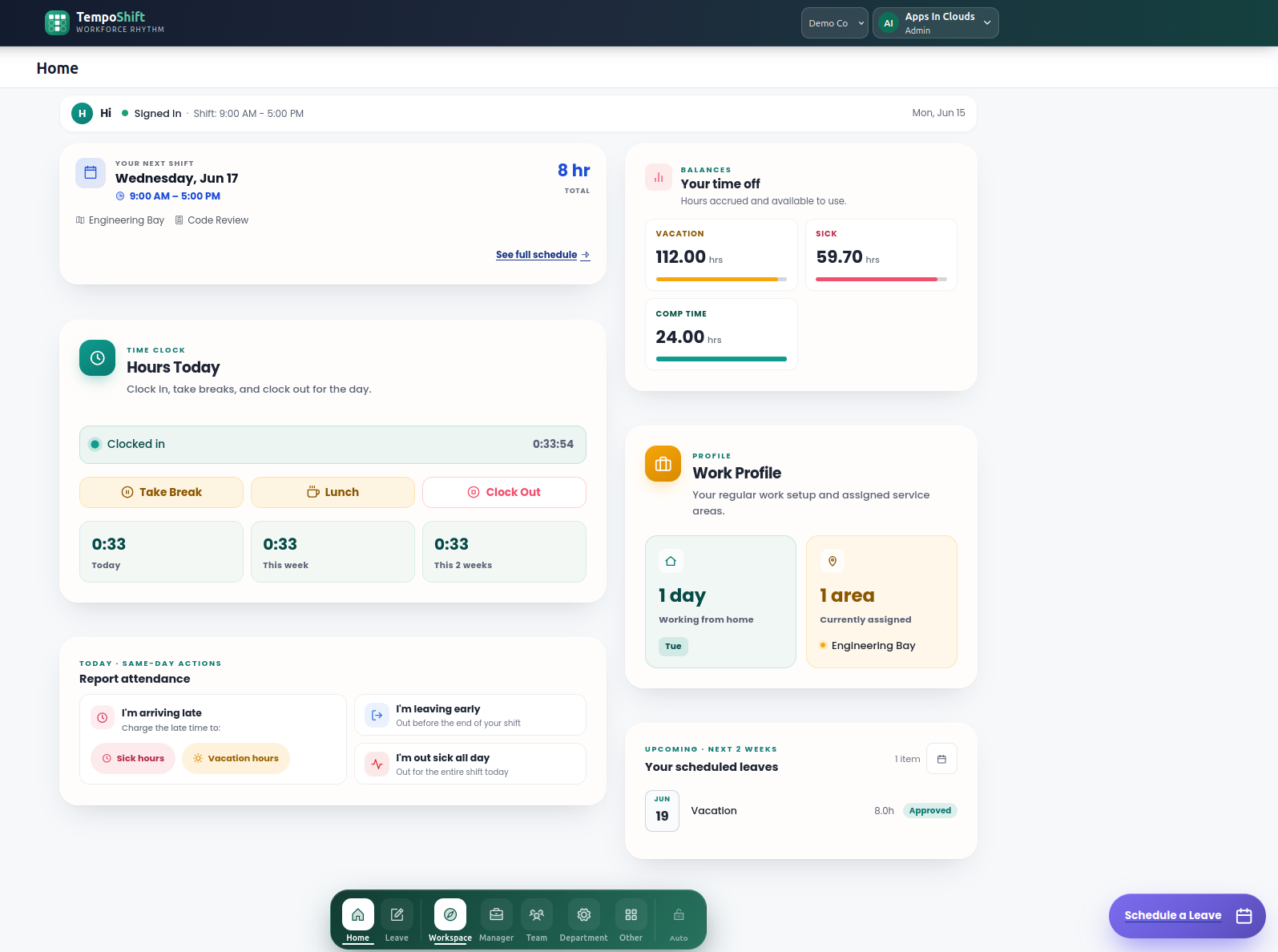
Real screens from TempoShift. This is what running itself looks like.
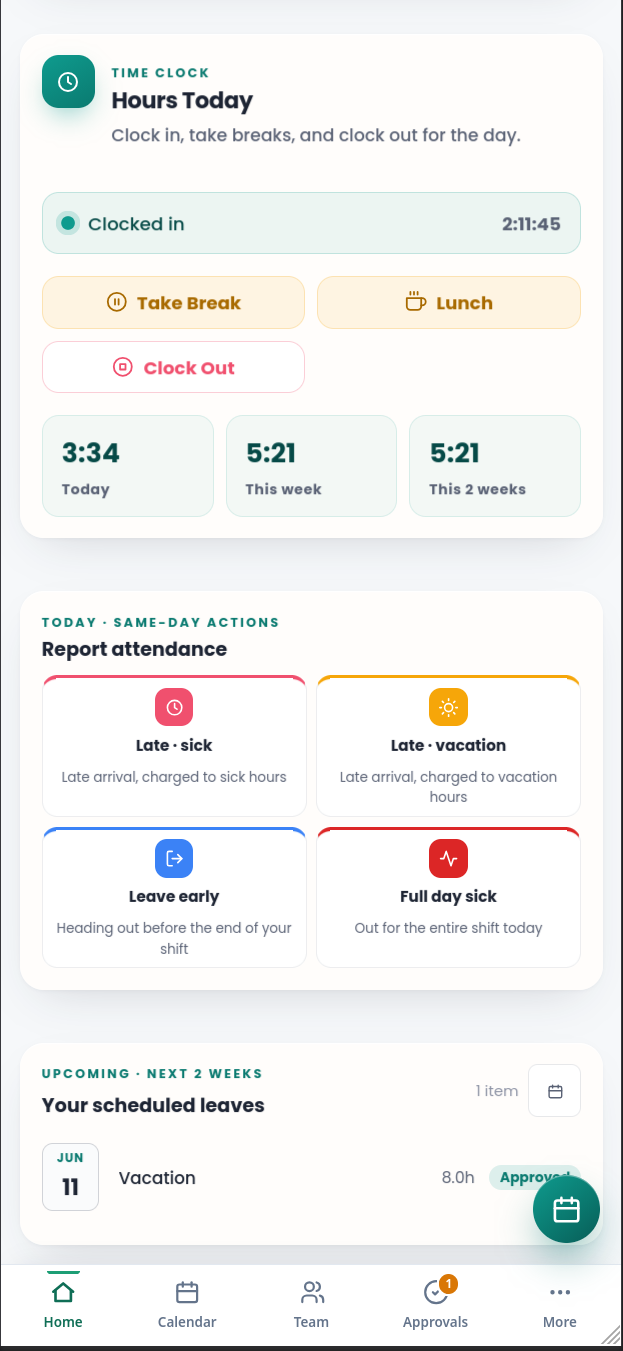
Employees tap a single button — Running Late, Out for Rest of Day, Full Day Sick — and TempoShift calculates the hours, notifies the manager, and updates the balance. Live balance cards sit right next to it.
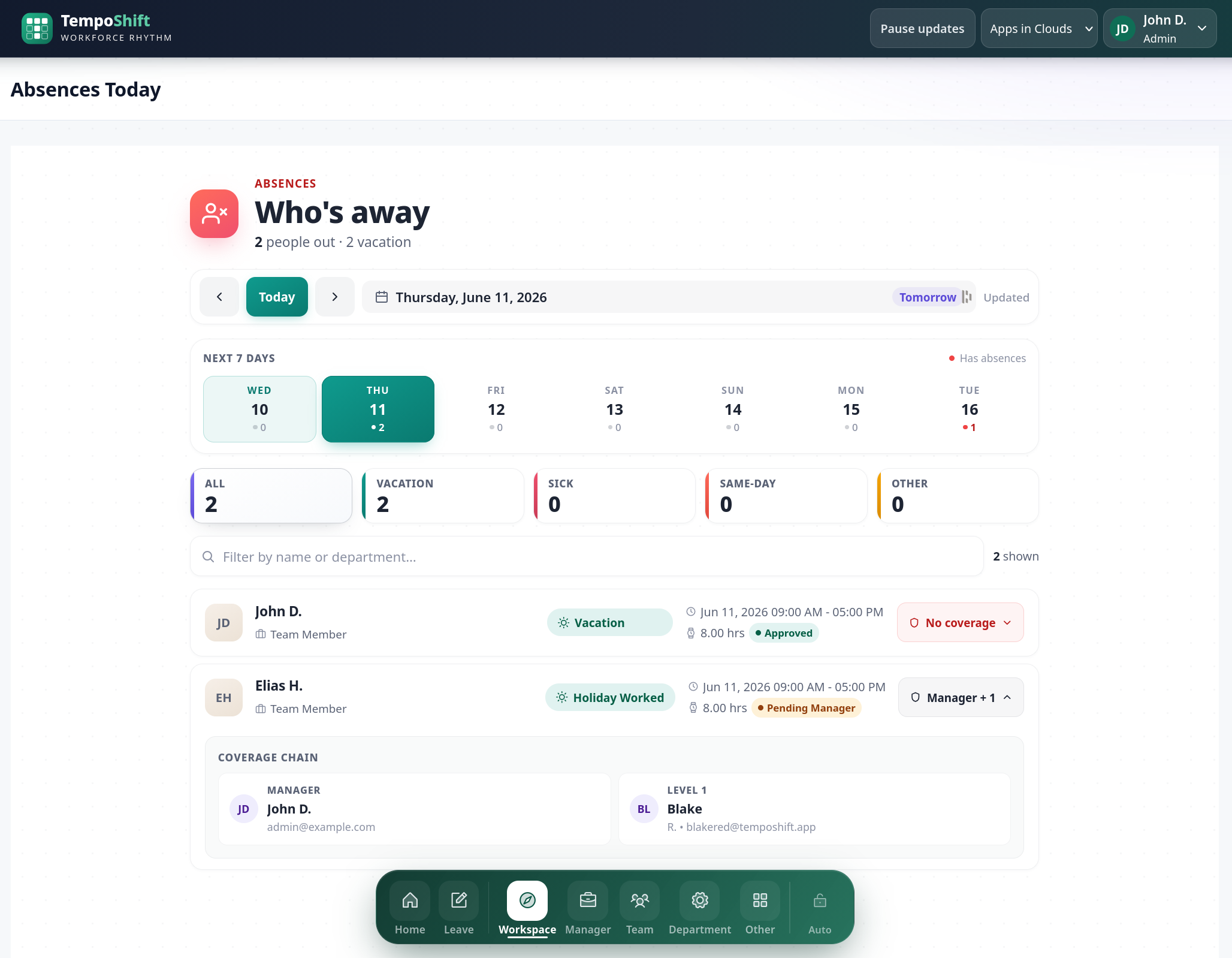
Requests route automatically — backup approvers first, then the manager — with email notifications at each step. Out of office? Delegate approvals to a covering manager for exactly the dates you choose, and they hand back automatically.
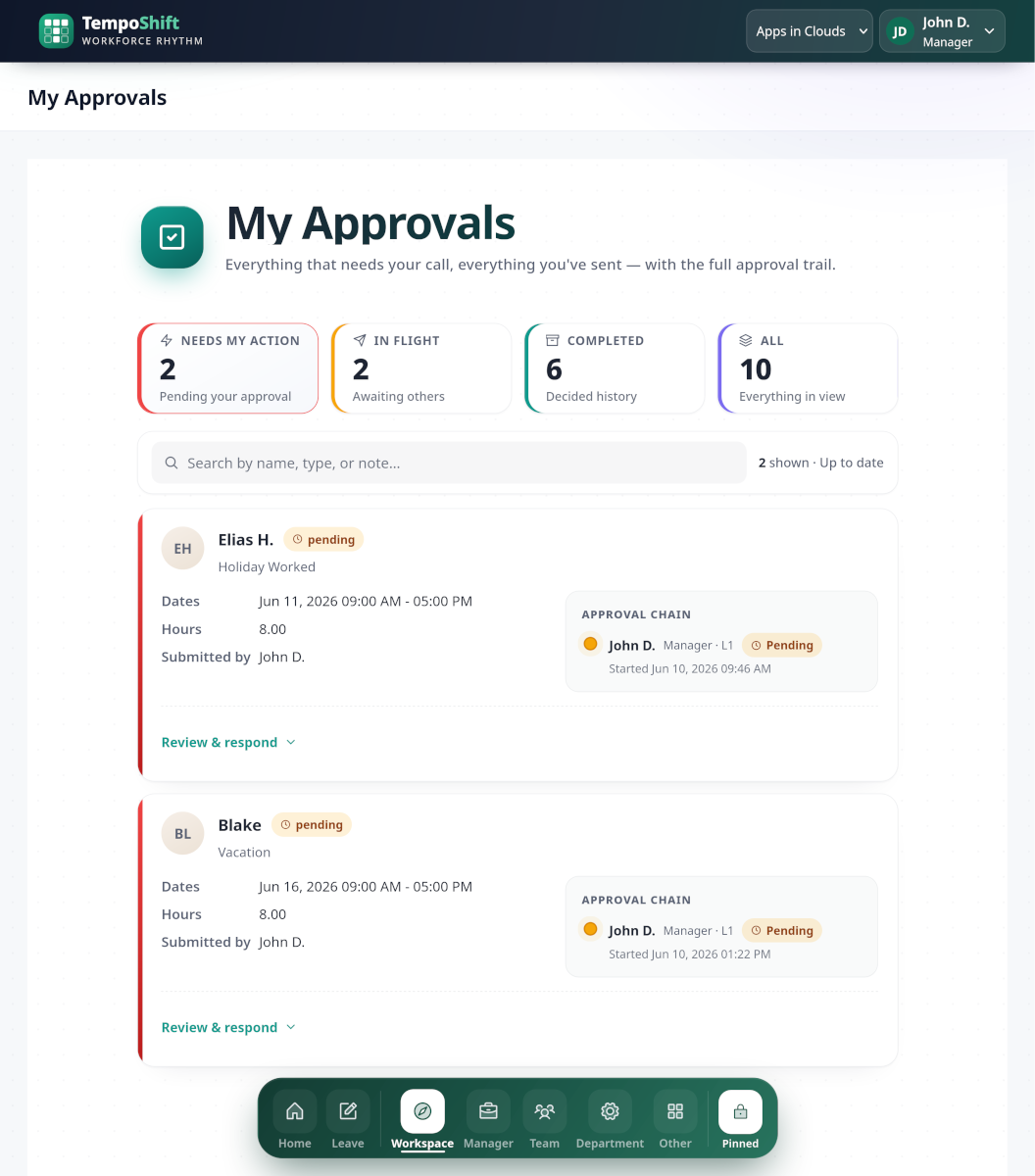
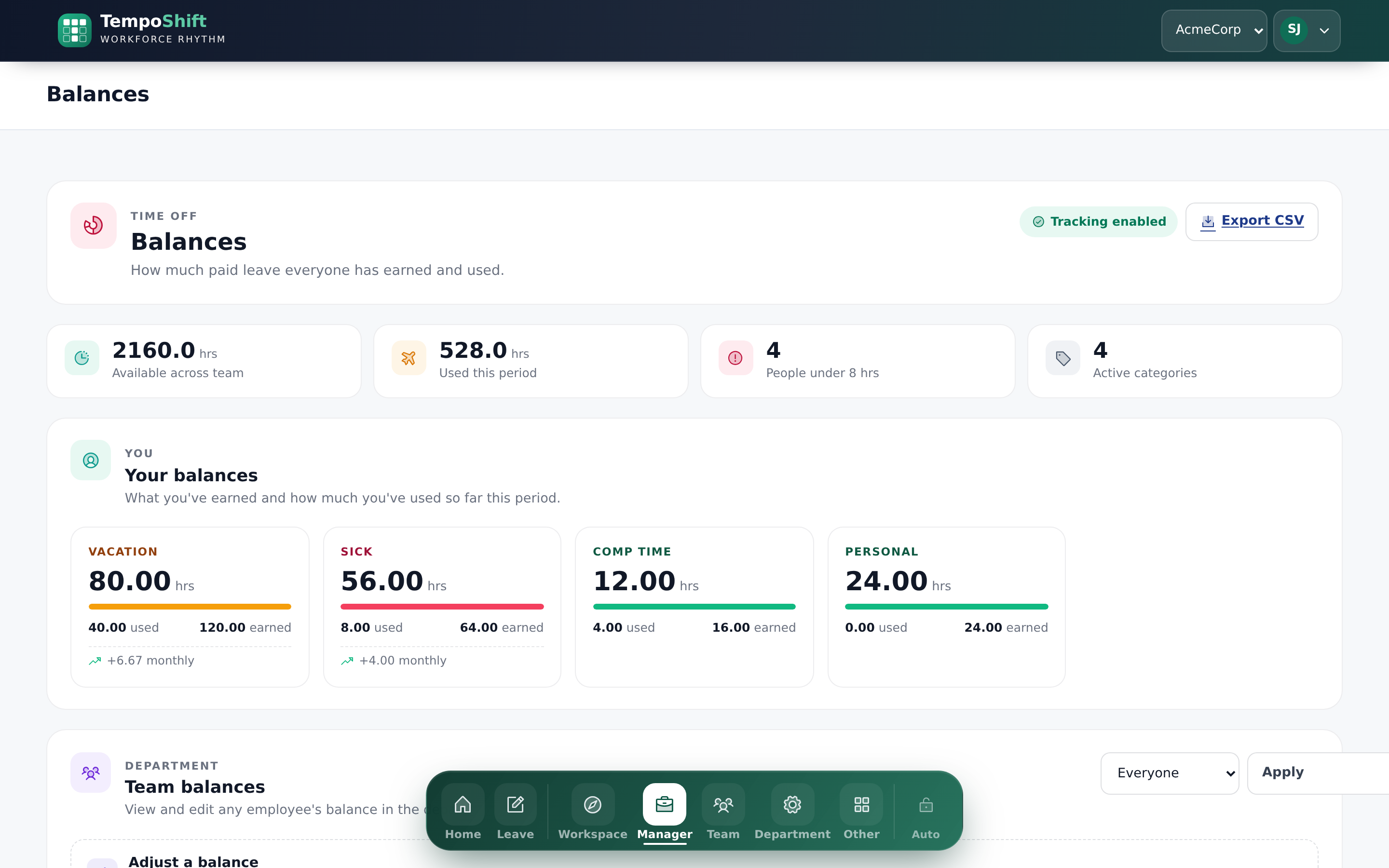
Vacation accrues on service-based tiers that grow with tenure, sick time accrues monthly, and carry-forward caps apply themselves. Every deduction, refund, and adjustment lands in a transaction ledger — so "where did my hours go?" is one click away.
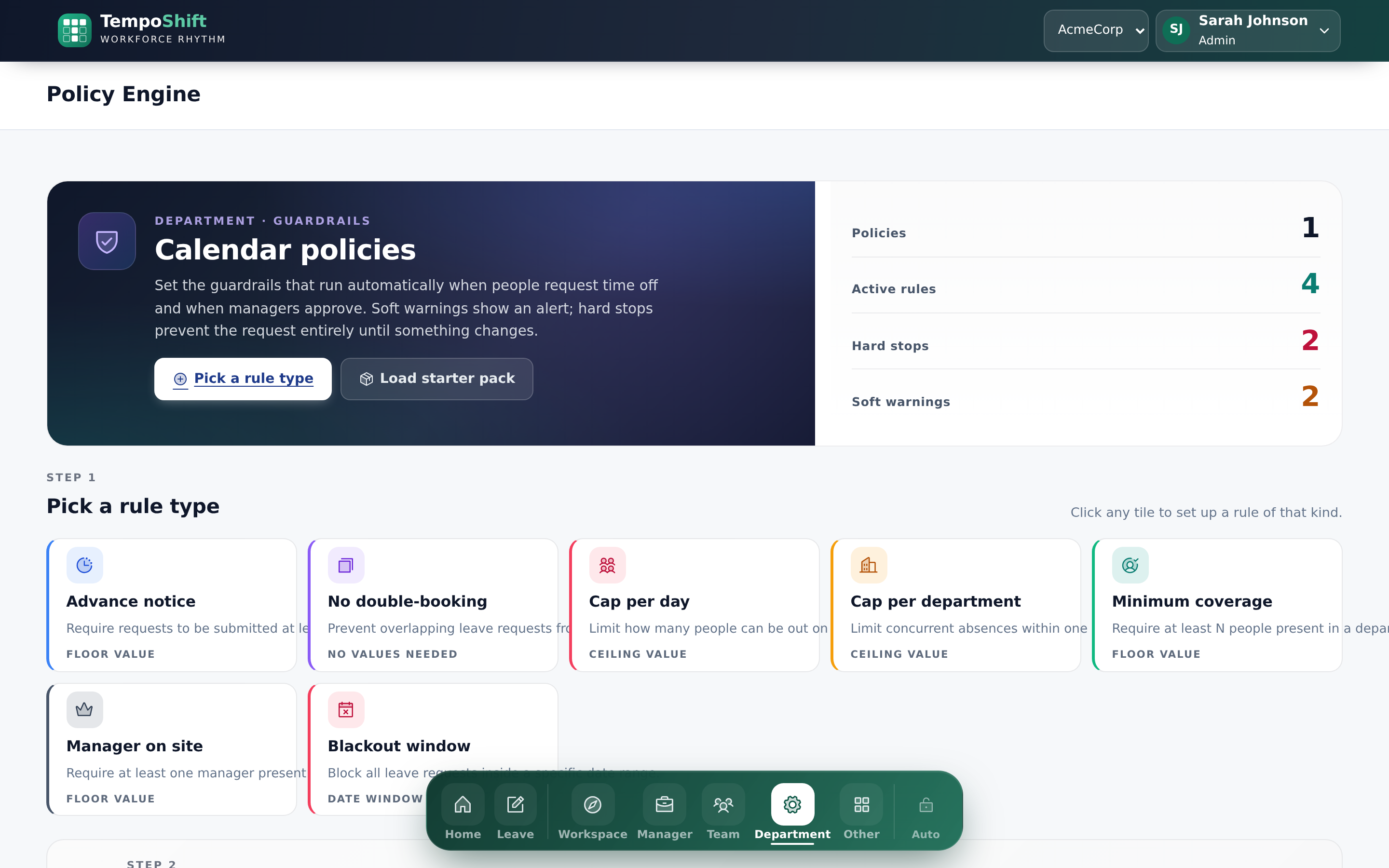
Stop policing requests by hand. Define rules once — minimum advance notice, no overlapping requests, coverage minimums by department — and TempoShift blocks or flags violations before a request is ever submitted.
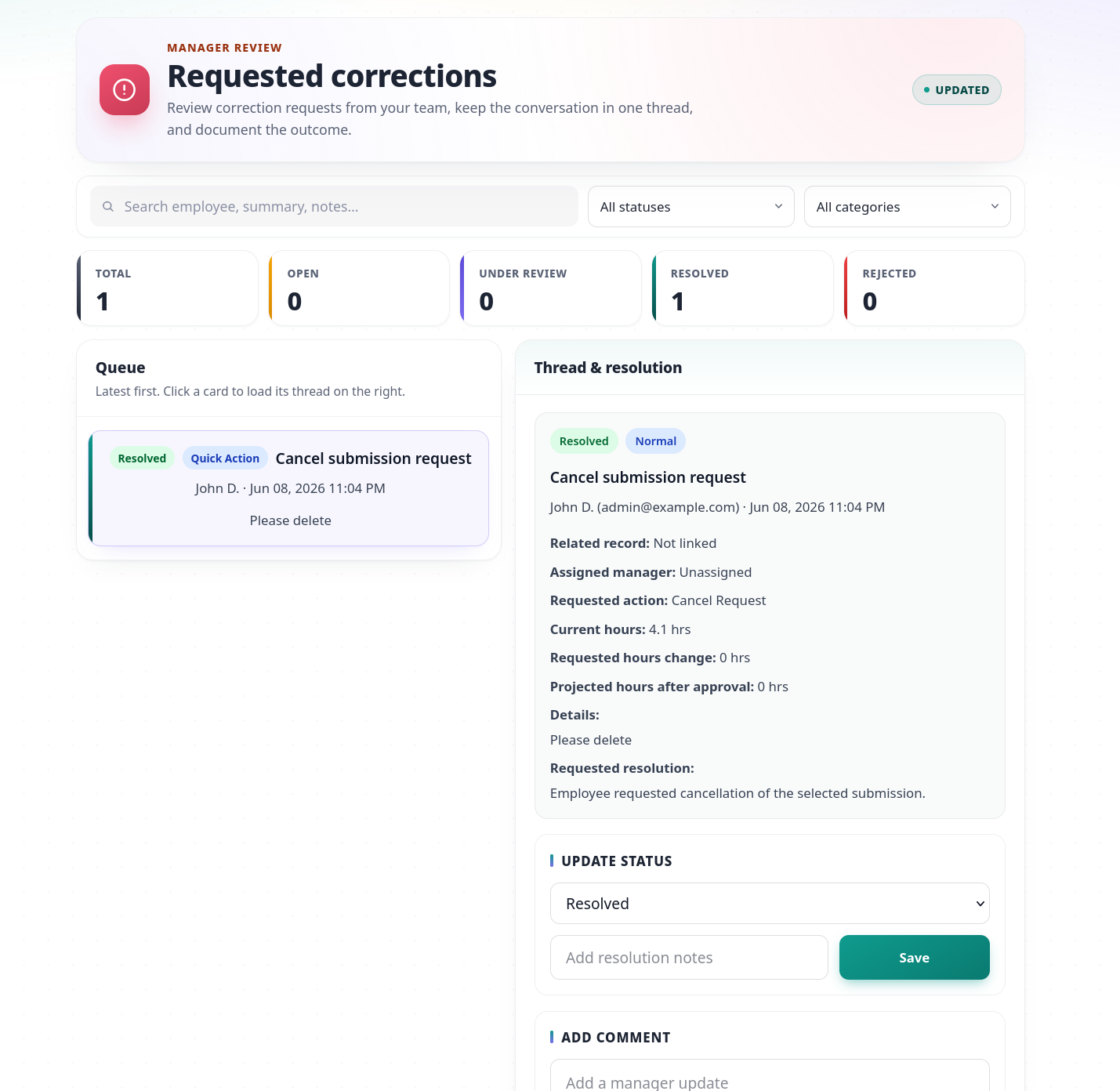
Mistakes happen. Employees and managers formally request changes to past submissions — increase, decrease, or cancel — with comments, attachments, and a clear approval trail. On approval, the request, the balance, and the queue all update together.
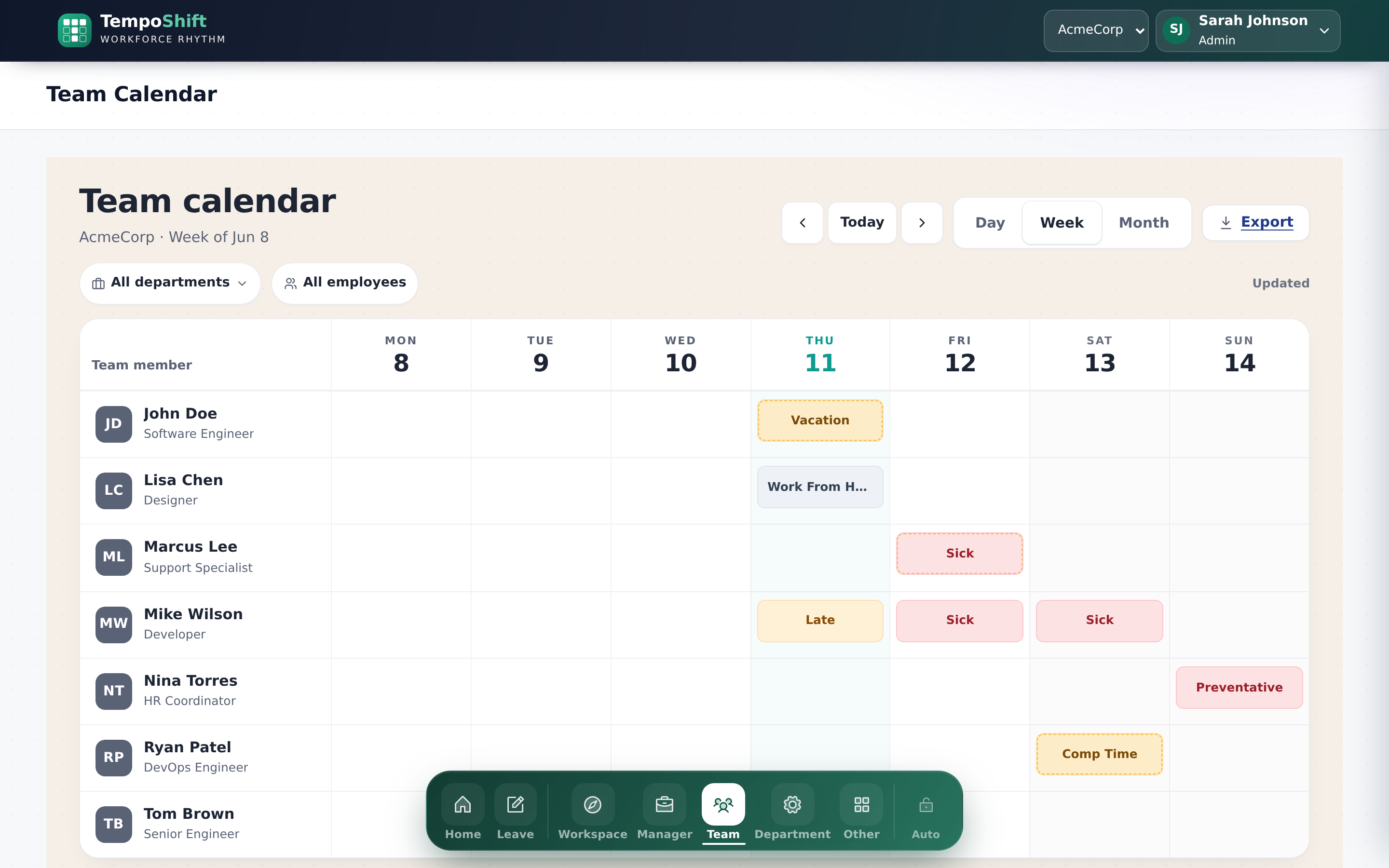
Day, week, and month views of who's out, color-coded by leave type. Approved leave syncs to your shared Microsoft 365 calendar automatically, and personal and team ICS feeds drop straight into Outlook, Google Calendar, or Apple Calendar.
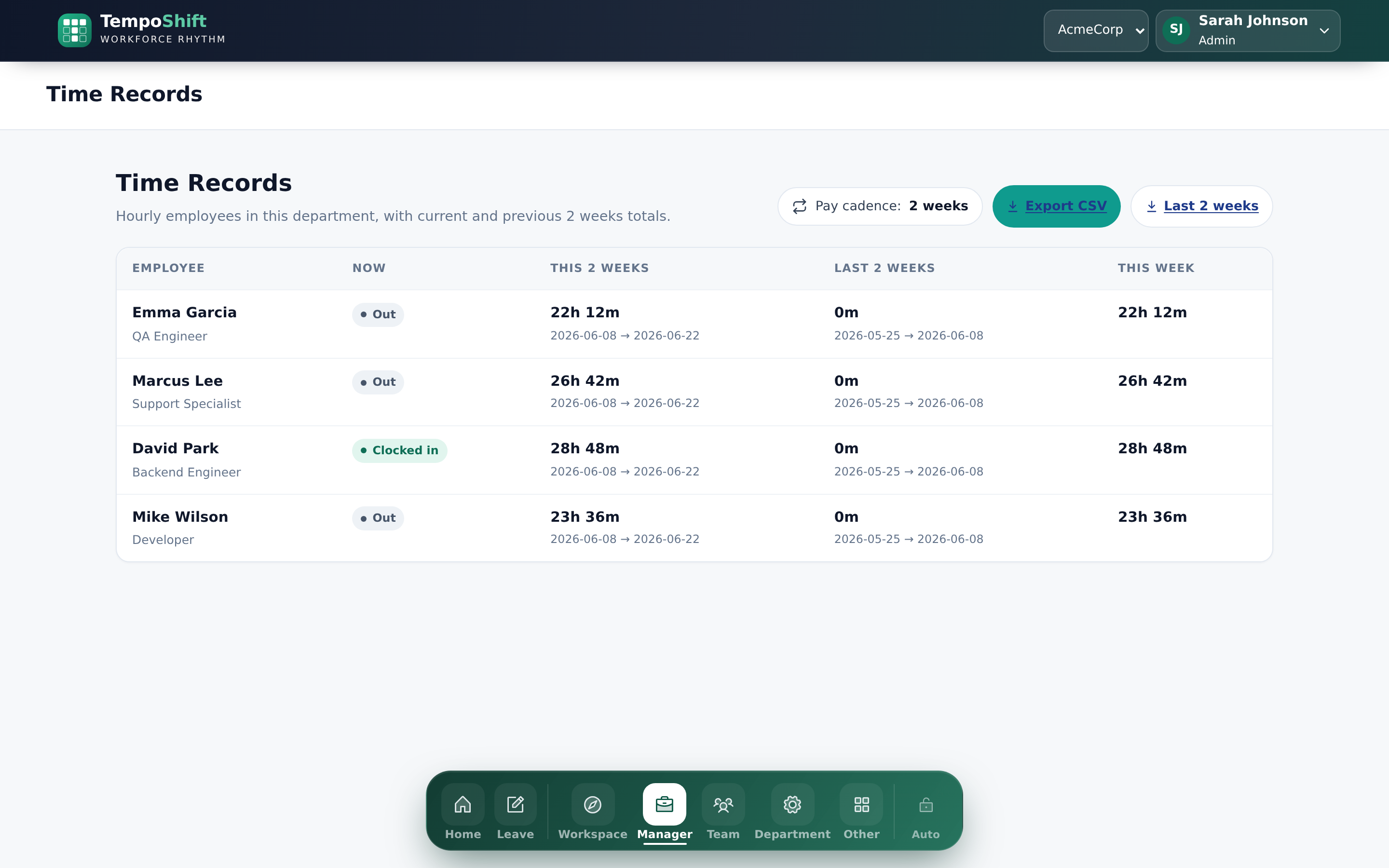
A time clock with guardrails on one end, exports your payroll provider actually accepts on the other.
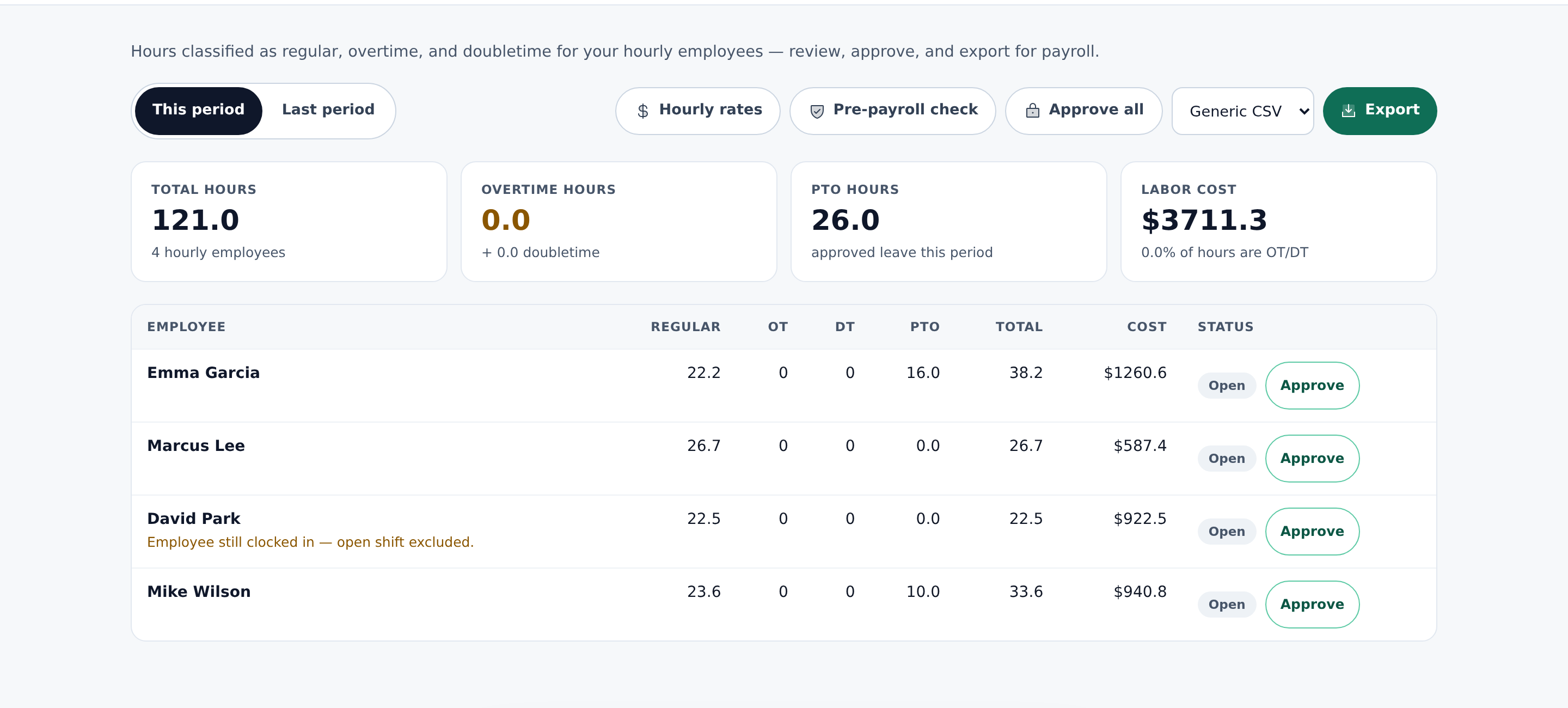
Punch in and out, track breaks, and apply configurable overtime rules. Payroll period locks prevent anyone from quietly editing a closed pay period, and manager edits are recorded so the trail stays auditable.
Generate exports formatted for Gusto, ADP, QuickBooks, or generic CSV. Hours are classified as regular, overtime, and doubletime, with PTO folded in. Every export is frozen and reproducible — what you sent to payroll is always exactly what you can pull up later.
TempoShift is an installable progressive web app, fully responsive on phones and tablets — no app store required. The same one-tap quick actions, approval chains, and audit trail, in your pocket.
TempoShift takes the busywork out of managing people's time — no spreadsheets, no chasing, no surprises.
Backup approvers first, then the manager, with email notifications at each step. Out-of-office delegation hands approvals to a covering manager for exactly the dates you choose — then hands them back.
Running late, out sick, leaving early — one button. TempoShift calculates the hours, notifies the manager, and updates the balance. No form required.
Vacation on service tiers that grow with tenure, sick time monthly, carry-forward caps applied automatically — with a transaction ledger behind every number and CSV import/export.
Minimum notice, no overlaps, coverage minimums by department — defined once, enforced before submission. A starter pack of recommended rules gets you running in one click.
Formal requests to fix past submissions — increase, decrease, or cancel — with comments, attachments, and an approval trail. Request, balance, and queue update together.
Punch in/out and break tracking with configurable overtime rules — and payroll period locks that keep closed pay periods closed.
One-click exports formatted for Gusto, ADP, QuickBooks, or generic CSV. Every export is frozen and reproducible — what you sent is what you can pull up later.
Microsoft 365 sync for approved leave, live ICS feeds for Outlook, Google, and Apple Calendar, team absence views, and a master holiday calendar with department variations.
Build shifts and let employees request swaps with manager sign-off — coverage stays intact while the roster stays flexible.
Team activity and analytics dashboards, employee snapshots and timelines, an org chart generated from your reporting structure, and WFH tracking with backup-coverage alerts.
Track credentials and renewals so nothing lapses unnoticed, and handle hardware and equipment requests end to end — without another inbox.
AI assistance you can enable or disable per organization, with every interaction logged — plus a notification audit log recording every email the system sends.
TempoShift is the tool we wished we'd had: one place where a time-off request takes seconds, balances keep themselves honest, your rules apply before a request is ever submitted, and payroll exports in the format your provider actually wants — no side spreadsheets, no chasing, no surprises at the end of the period.
We built it for the manager approving from a phone in the carpool line and the ops lead who just wants payroll prep to stop eating a day every cycle. If that's you, the trial is free for 14 days and there's no credit card required.
— The TempoShift team
Pay monthly or annually. Add or remove seats anytime. Every plan includes the mobile experience and the audit trail.
For small teams getting their first system off email and spreadsheets.
For growing teams that need policy enforcement, payroll exports, and AI in the loop.
For larger organizations with SSO, SCIM, and procurement requirements.
Multi-tenant role-based access, logged AI, audited notifications, and accessibility by design.
Multi-tenant with employee, manager, and admin roles, scoped down to the department level.
AI-assisted workflows can be enabled or disabled per organization — and every interaction is logged.
Every email the system sends is recorded — approvals, reminders, escalations, all of it.
Built and remediated against WCAG accessibility standards, and installable as a progressive web app.
Start your 14-day free trial. No credit card, no sales call — we'll set up your workspace within one business day.